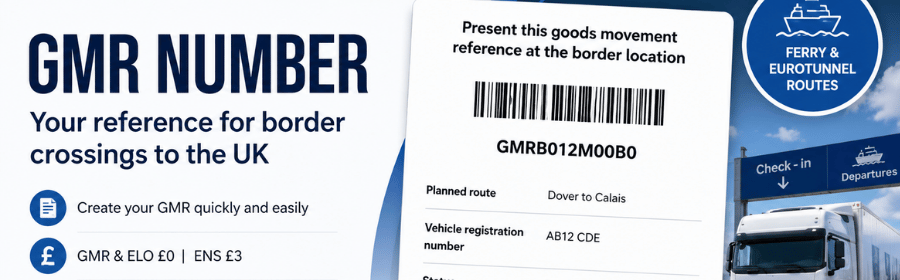
If you transport goods between Great Britain and the European Union, you may need a GMR number. GMR stands for Goods Movement Reference and is generated through the UK Goods Vehicle Movement Service (GVMS). It links a vehicle movement with the relevant customs formalities.
Whether you need a GMR depends primarily on the route and port or terminal you use. In this guide, we explain what a GMR number is, when you need one, what information you should prepare and how to create a GMR for your journey.
Need a GMR number?
Create your GMR number online with Simple Duty. In the same application, you can also prepare an ELO envelope and submit an ENS declaration for movements between Great Britain and the European Union.
What is a GMR number?
A GMR (Goods Movement Reference) is a unique reference generated through the UK’s GVMS (Goods Vehicle Movement Service).
GVMS supports the movement of goods across the UK border. It links information about a vehicle journey with the relevant customs declarations and references.
In practice, a GMR acts as a single reference for the vehicle movement. Depending on the direction of travel and customs procedures involved, it can link relevant customs or transit MRNs and other required references.
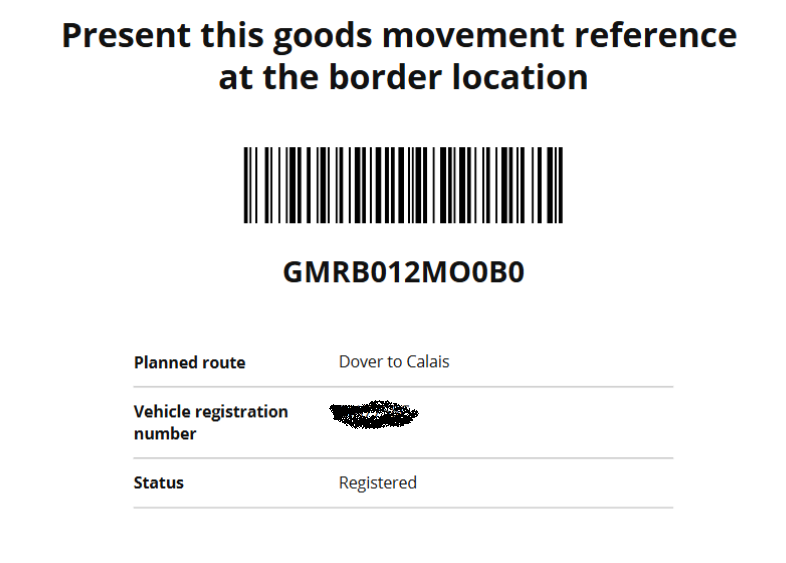
Once the GMR has been created, the haulier receives a unique reference together with a barcode. The driver should have access to it before arriving at the ferry terminal or Eurotunnel.
The carrier or terminal operator uses the GMR during check-in to link the vehicle and its goods with the information held in GVMS.
It is therefore important to distinguish between the two terms:
GVMS is the UK government system, while GMR is the reference for a specific vehicle movement created within that system.
When do you need a GMR number?
Whether you need a GMR number depends primarily on the route and the port or terminal used to cross the UK border.
GMRs are required on routes handled through the Goods Vehicle Movement Service. However, not every port or terminal uses GVMS in exactly the same way. It may apply to all movements or only to particular directions and services.
Therefore, before starting a journey, you should check whether your chosen crossing uses GVMS. If GVMS applies to your route, you should have the correct GMR ready before the vehicle arrives at the terminal.
You can check the current list of ports using GVMS on the official UK government website.
When using the Simple Duty application, you do not need to determine this manually. Based on the route you enter, the system automatically identifies the relevant process and allows you to create a GMR directly within the application.
What does a GMR number look like?
Once you create a GMR in GVMS, you receive a unique reference assigned to that particular vehicle movement. The GMR also includes a barcode, which the driver can present during check-in before the crossing.
A GMR applies to the vehicle movement as a whole rather than to a single shipment or customs declaration. Therefore, one GMR can contain references relating to multiple consignments carried on the same journey.
The driver should have access to the current GMR before arriving at the terminal. It can be provided electronically. The important point is that the driver can present the correct GMR number or barcode when required.
How do you create a GMR number?
You can create a GMR directly through the UK government’s Goods Vehicle Movement Service. HMRC provides detailed guidance in its Create a goods movement reference instructions.
Alternatively, you can create your GMR through the Simple Duty application. The application guides you through the process, identifies the route and allows you to manage the border formalities for the journey in one place.
To create a GMR using Simple Duty:
- Create a new shipment and enter the country of departure, destination and any transit countries.
- Enter the transport details, including the vehicle registration number, planned crossing date and selected route.
- Add the required customs declaration and document references for the goods being transported.
- Create the GMR – the application sends the required information to GVMS and retrieves the GMR.
- Share the GMR with the driver – the GMR number and barcode can then be provided to the driver before the crossing.
The application is not limited to GMR. If the selected route requires additional border formalities, you can also create an ELO envelope and submit an ENS declaration within the same shipment.
Create your GMR with Simple Duty
What information do you need to create a GMR?
The information required to create a GMR depends on the direction of travel and the customs procedures used for the goods.
Before creating a GMR, you should normally have the following information available:
- vehicle details, particularly the vehicle registration number or other relevant means of transport identification,
- route and crossing details,
- customs declaration reference numbers relating to the goods,
- transit MRNs, where the goods move under a transit procedure,
- ATA Carnet or TIR references, where applicable,
- other required references, depending on the route and customs procedure.
One GMR can contain references relating to several consignments carried during the same vehicle movement. Therefore, before the crossing, make sure the GMR contains all the references required for the journey.
When you use Simple Duty, the application can reuse information already entered for the shipment. This reduces duplicate data entry when preparing the GMR and other border formalities.
What should you do with the GMR after creating it?
Once you have created the GMR, give it to the driver before the crossing. The driver should have access to the GMR number and its barcode for check-in at the port or terminal.
Before arriving at the terminal, check that the GMR contains the correct references and vehicle details. If information about the journey changes before check-in, update the GMR accordingly.
During check-in, the system links the GMR to the specific vehicle movement. Its status then changes as the vehicle progresses through the border process.
When using Simple Duty, the GMR remains available with the shipment information. You can therefore manage it together with the other information and documents required for the journey.
GMR, ELO and ENS – what is the difference?
Depending on the route, a GMR may not be the only border formality required for a journey between Great Britain and the European Union. The carrier may also need an ENS declaration and, for movements through France, an ELO envelope.
Each serves a different purpose:
- GMR (Goods Movement Reference) – a reference created in the UK’s GVMS system for vehicle movements using routes handled through GVMS.
- ELO (Enveloppe Logistique Obligatoire) – an electronic logistics envelope used for movements across the French-British border. It links the relevant formalities to the vehicle journey.
- ENS (Entry Summary Declaration) – a safety and security declaration submitted before goods enter a customs territory where an ENS is required.
With Simple Duty, you can prepare these formalities within one shipment:
| Service | Price |
|---|---|
| GMR number | £0 |
| ELO envelope | £0 |
| ENS declaration | £3 |
Free GMR and ELO creation applies to shipments where the ENS declaration is created through the Simple Duty application.
This means you do not have to work across several different systems or repeatedly enter the same transport information. Simple Duty uses the selected route to help organise the formalities required for the journey.
Create your shipment in Simple Duty
Frequently asked questions about GMR numbers
GMR stands for Goods Movement Reference. It is a unique reference created through the UK’s Goods Vehicle Movement Service (GVMS) and used to link a vehicle movement with the relevant customs information.
No. Whether a GMR is required depends primarily on the route, port or terminal and how the particular crossing operates with GVMS. Always check the requirements for your chosen route before travelling.
You can create a GMR directly through the UK government’s GVMS service or use software integrated with GVMS. Simple Duty allows you to create and manage the GMR as part of the same shipment used for other border formalities.
With Simple Duty, a GMR costs £0. You can also create an ELO for £0 and submit an ENS declaration for £3 within the application.
The GMR does not have to exist only as a paper document. The important point is that the driver has access to the correct GMR number and barcode and can present them during check-in when required.
No. They perform different functions. GMR relates to the UK’s GVMS system, ELO groups formalities for movements across the French-British border, while ENS is a safety and security declaration required before goods enter the relevant customs territory.
Prepare the border formalities for your EU–UK journey in one place. Create your GMR and ELO for £0 and submit your ENS declaration for £3.
Enter your route and shipment details, prepare the required formalities and provide the driver with the documents needed for the crossing.